
Add Watermark
Add Watermark is for add a watermark. It keeps the page focused on that one job, so you can check the watermarked file without opening a larger app.

Add Watermarks to PDFs
Add Watermark is for add a watermark. It keeps the page focused on that one job, so you can check the watermarked file without opening a larger app.
How to Use This Tool
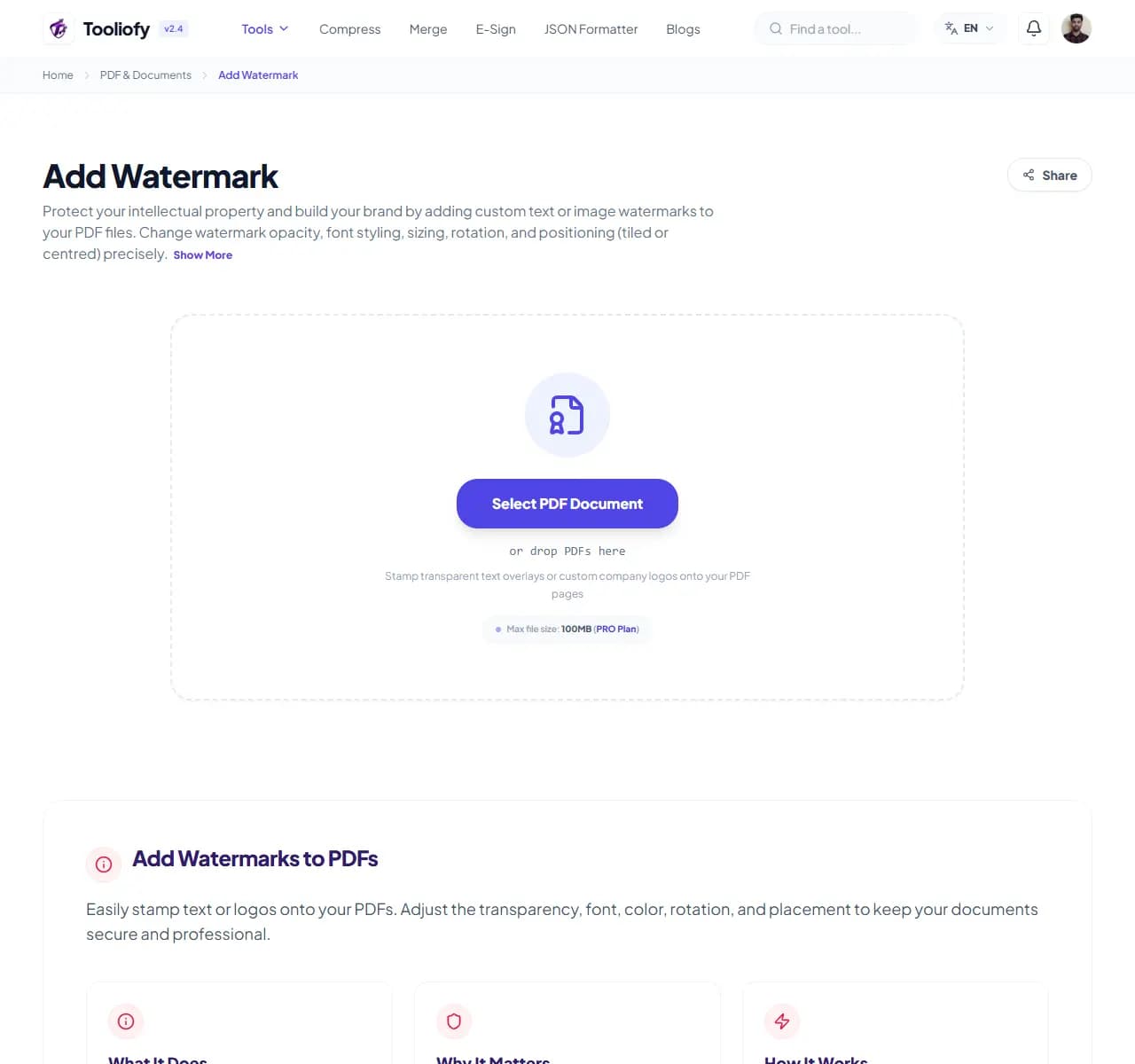
1. Select File
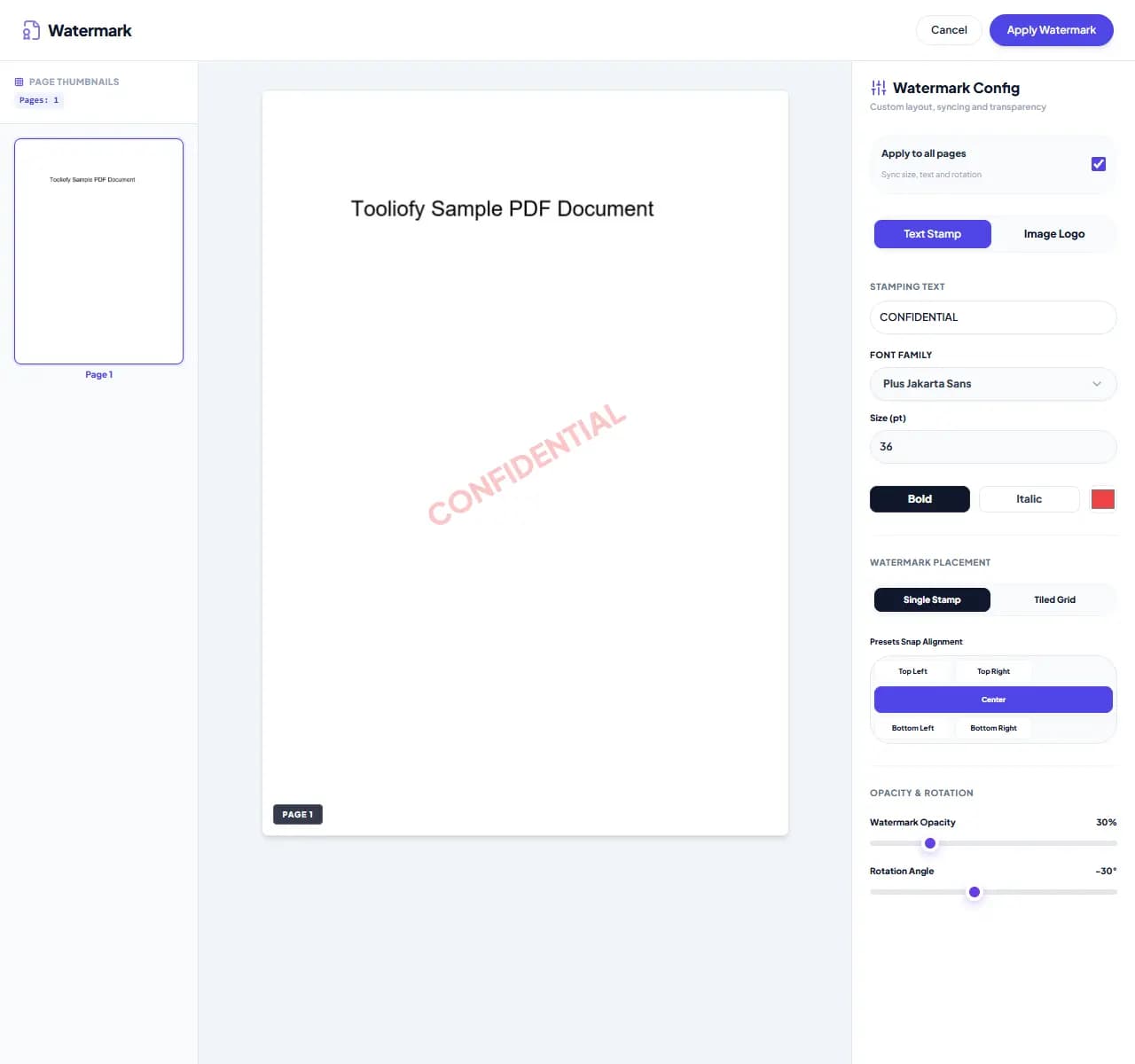
2. Processing

3. Download File
What you can do with Add Watermark
Add Watermark turns adding a watermark to a PDF into a few clear choices. It is helpful for mark up draft documents for peer review, where checking the output matters.
When Add Watermark helps
A watermark can show ownership, review status, or context before sharing. Add Watermark gives you a quick way to handle that before you share, publish, or move on.
How the PDF is handled
Add Watermark works with the pages, layout, or document data needed to add a watermark to a PDF, then creates a fresh file for comparison.
When Add Watermark is the right tool
A good Add Watermark pass is simple: start with the input, run the step to add a watermark to a PDF, and look over the result. That habit matters for mark up draft documents for peer review.
Useful for
- Add your company branding to client invoices.
- Add branding to your historical document archives.
- Add Watermark works with PDF, Use PNG or JPG for your logos.
Pause first if
- The document needs rewriting instead of a small PDF change.
- You do not own the file or have permission to edit it.
Common mistake
- Compressing too early and then having to process the file again.
- Sending the new PDF without opening it beside the original.
Privacy note: Keep the original file until Add Watermark has produced a result you have checked. For private PDFs, avoid shared computers and only unlock protected files when you have permission.
Supported Formats
Common Add Watermark tasks
- Stamp 'CONFIDENTIAL' on sensitive agreements
- Mark up draft documents for peer review
- Add your company branding to client invoices
- Protect your photography ebooks from theft
- Add branding to your historical document archives
Why this PDF tool is handy
- Permanent, clear embedding
- Subtle, reliable transparency
- Works with both simple text and brand logos
- Secure, secure processing for your peace of mind
- Free. No sign-up required.
What is included
- Add custom text stamps like 'DRAFT' or 'CONFIDENTIAL'
- Add your own logo as a custom watermark
- Fine-tune transparency and opacity easily
- Rotate your watermarks to the right angle
- Choose your placement: center, tiled grid, or headers and footers
- Pick specific pages to watermark
- Privacy: your files stay on your device, never uploaded to a server
"For mark up draft documents for peer review, Add Watermark keeps the work short and leaves you with an output you can review before moving on."

More PDF & Documents
Create PDF
Create PDF helps when the next step is simple: create a new PDF with text, images, shapes, pages, and signatures. It is built for quick fixes, checks, and downloads.
PDF to Word
PDF to Word helps when the next step is simple: turn PDF files into Word. It is built for quick fixes, checks, and downloads.
Word to PDF
Word to PDF helps when the next step is simple: turn Word files into PDF. It is built for quick fixes, checks, and downloads.
PDF to Excel
Open PDF to Excel when your PDF file needs one clear change. The tool keeps the process short and the Excel file easy to inspect.
Excel to PDF
Open Excel to PDF when your Excel file needs one clear change. The tool keeps the process short and the PDF file easy to inspect.
PDF Merge
PDF Merge helps when the next step is simple: combine separate files into one ordered result. It is built for quick fixes, checks, and downloads.
Explore Other Categories
 5 Tools
AI Tools
Explore our ai tools and start processing your files securely.
 58 Tools
Image Tools
Explore our image tools and start processing your files securely.
 24 Tools
Text Utilities
Explore our text utilities and start processing your files securely.
 10 Tools
Developer Tools
Explore our developer tools and start processing your files securely.
Can't find a specific tool?
We are constantly adding new features based on user feedback. Tell us what you need and we will implement it immediately!